Extending Ruby LSP with Prism
Ruby LSP is a wonderful language server built on top of Prism, Rubydex and RBS. It implements a variety of features that enrich the code editing experience in Ruby projects. Its add-on architecture allows extending it with Rails features, Rubocop support and custom functionality.
Coming from Vim, I was really used to rails.vim. When I switched to Zed, I started using Ruby LSP. In some ways I felt like I’d gained superpowers, as now I had all these modern editor features that are possible because my Ruby code is actually being parsed. On the other hand, I found there were some features I was missing.
One such feature was following render calls in view templates. Rails.vim offered a gf (“go to file”) mapping, which when hovering over a render call would take me to the partial being rendered. In LSP terminology this functionality is called “go to definition”. If I were to implement it, I knew it had to live in the Rails add-on.
LSP mechanics
Before we can get into the weeds, we need to establish how language servers work. The Language Server Protocol (LSP) defines JSON-RPC messaging between a code editor and a server process.
When you hover over a Ruby class constant and hold cmd, Zed will send a message to Ruby LSP in the following format:
{
  "jsonrpc": "2.0",
  "id": 5,
  "method": "textDocument/definition",
  "params": {
    "textDocument": {
      "uri": "file:///path/to/source.rb"
    },
    "position": { "line": 7, "character": 27 }
  }
}
Since Ruby LSP indexes all constant declarations on initialization, it can then respond with the location where the constant is defined:
{
  "id": 5,
  "result": [
    {
      "targetUri": "file:///path/to/class.rb",
      "targetRange": {
        "start": { "line": 8, "character": 2 },
        "end": { "line": 253, "character": 5 }
      },
      "targetSelectionRange": {
        "start": { "line": 8, "character": 9 },
        "end": { "line": 8, "character": 19 }
      }
    }
  ],
  "jsonrpc": "2.0"
}
Here we can see Ruby LSP returned the location of the class ... end block (targetRange) as well as the constant name the editor should select (targetSelectRange). Notice that the result field is an array, allowing for multiple locations in case the class is re-opened more than once (for which Zed will open a multibuffer).
Custom add-on
Back to the task at hand. I needed to test out my Ruby LSP extension locally first. It turns out Ruby LSP will automatically pick up any add-ons in your project directory, they just need to match **/ruby_lsp/**/addon.rb. So, I put mine in lib/ruby_lsp/my_app/addon.rb:
# lib/ruby_lsp/my_app/addon.rb
require "ruby_lsp/addon"

module RubyLsp
  module MyApp
    class Addon < RubyLsp::Addon
      def activate(global_state, outgoing_queue)
        outgoing_queue << Notification.window_log_message("Activated My App addon")
      end
    end
  end
end
If everything works correctly, after restarting your Ruby LSP server, you should see the “Activated My App addon” message in the language server logs.
When Ruby LSP receives a textDocument/definition request, it calls #create_definition_listener on every add-on with some parameters, allowing them to add their own locations to the response. Let’s override it:
# lib/ruby_lsp/my_app/addon.rb
# ...
require_relative "definition"

module RubyLsp
  module MyApp
    class Addon < RubyLsp::Addon
      # ...
      def create_definition_listener(...)
        Definition.new(...)
      end
    end
  end
end
# lib/ruby_lsp/my_app/definition.rb
module RubyLsp
  module MyApp
    class Definition
      def initialize(response_builder, uri, node_context, dispatcher)
        @response_builder = response_builder
        @path = uri.to_standardized_path
        @node_context = node_context
        @dispatcher = dispatcher
      end
    end
  end
end
Prism drilling
Ruby LSP will use Prism to parse the source document where we activated go-to-definition, set up a dispatcher for walking the AST, and save the context of the AST node you’re hovering over. In our case, we want to react on partial names passed to render calls. Since these are strings, let’s register a listener for entering string nodes:
# lib/ruby_lsp/my_app/definition.rb
module RubyLsp
  module MyApp
    class Definition
      def initialize(response_builder, uri, node_context, dispatcher)
        # ...
        dispatcher.register(self, :on_string_node_enter)
      end

      def on_string_node_enter(node)
        # ...
      end
    end
  end
end
First things first, we can only support following render calls inside HTML+ERB templates, as in helpers we don’t have the view/controller context. So, let’s early return otherwise:
def on_string_node_enter(node)
  return unless html_erb?
end

private

def html_erb?
  @path&.match?(/\.html(\+\w+)?\.erb/) # handle template variants
end
Unlike Solargraph, Ruby LSP has ERB support that can extract Ruby code, allowing it to provide the same features as for regular Ruby files. Templating languages like Slim and Haml have much more complex grammars, making it difficult to know where Ruby code is, so as of this writing they’re not supported.
We’ll return if the string node is not a “partial argument”, which we’ll define shortly after:
def on_string_node_enter(node)
  # ...
  return unless partial_argument?(node)
end

private

def partial_argument?(node)
  # ...
end
Inside #partial_argument?, let’s now grab the call node from the node context. For render "partial" code, that would be the render call, which is what we care about. It’s also possible there is no call node, in case a string node isn’t passed to any method invocation, so we need to handle that as well.
def partial_argument?(node)
  call_node = @node_context.call_node
  return unless call_node
  return unless call_node.message == "render"
end
We want to only accept render calls in template context (self.render technically counts here as well), so we reject any other receivers like Foo.render:
def partial_argument?(node)
  # ...
  return unless call_node.receiver.nil? || call_node.receiver.is_a?(Prism::SelfNode)
end
We’re interested whether the string node matches any of the render call arguments, so let’s retrieve them:
def partial_argument?(node)
  # ...
  arguments = call_node.arguments&.arguments # an array of arguments
  return unless arguments
end
If our string node is the first positional argument of the render call (e.g. render "foo"), then we found our partial name:
def partial_argument?(node)
  # ...
  return true if arguments.first == node
end
Otherwise we check for keyword arguments to handle explicit render partial: "foo" form as well. We only accept keyword arguments as the first argument, as we want to exclude render "bar", partial: "foo", where "foo" would be the value of a partial local variable.
def partial_argument?(node)
  # ...
  return unless arguments.first.is_a?(Prism::KeywordHashNode)

  arguments.first.elements.any? do |element|
    next unless element.is_a?(Prism::AssocNode)
    next unless element.key.is_a?(Prism::SymbolNode)

    element.key.value == "partial" && element.value == node
  end
end
Returning locations
Now that we’ve identified that our string node is indeed a partial name, let’s resolve the actual template file.
def on_string_node_enter(node)
  # ...
  resolve_partial(node)
end

private

def resolve_partial(node)
  # ...
end
If the string contains a /, it holds an absolute partial path, otherwise it’s a relative partial name. Since template engines and formats can be mixed, we handle any file extension.
def resolve_partial(node)
  partial_path = node.content

  template_glob = if partial_path.include?("/")
    *directory, name = partial_path.split("/")
    File.join("app/views", *directory, "_#{name}.*")
  else
    File.join(File.dirname(@path), "_#{partial_path}.*")
  end

  template_path = Dir[template_glob].first
  return unless template_path
end
Finally, we return the partial path in the response:
def resolve_partial(node)
  # ...
  @response_builder << Interface::Location.new(
    uri: URI::Generic.from_path(path: template_path).to_s,
    range: Interface::Range.new(
      start: Interface::Position.new(line: 0, character: 0),
      end: Interface::Position.new(line: 0, character: 0)
    )
  )
end
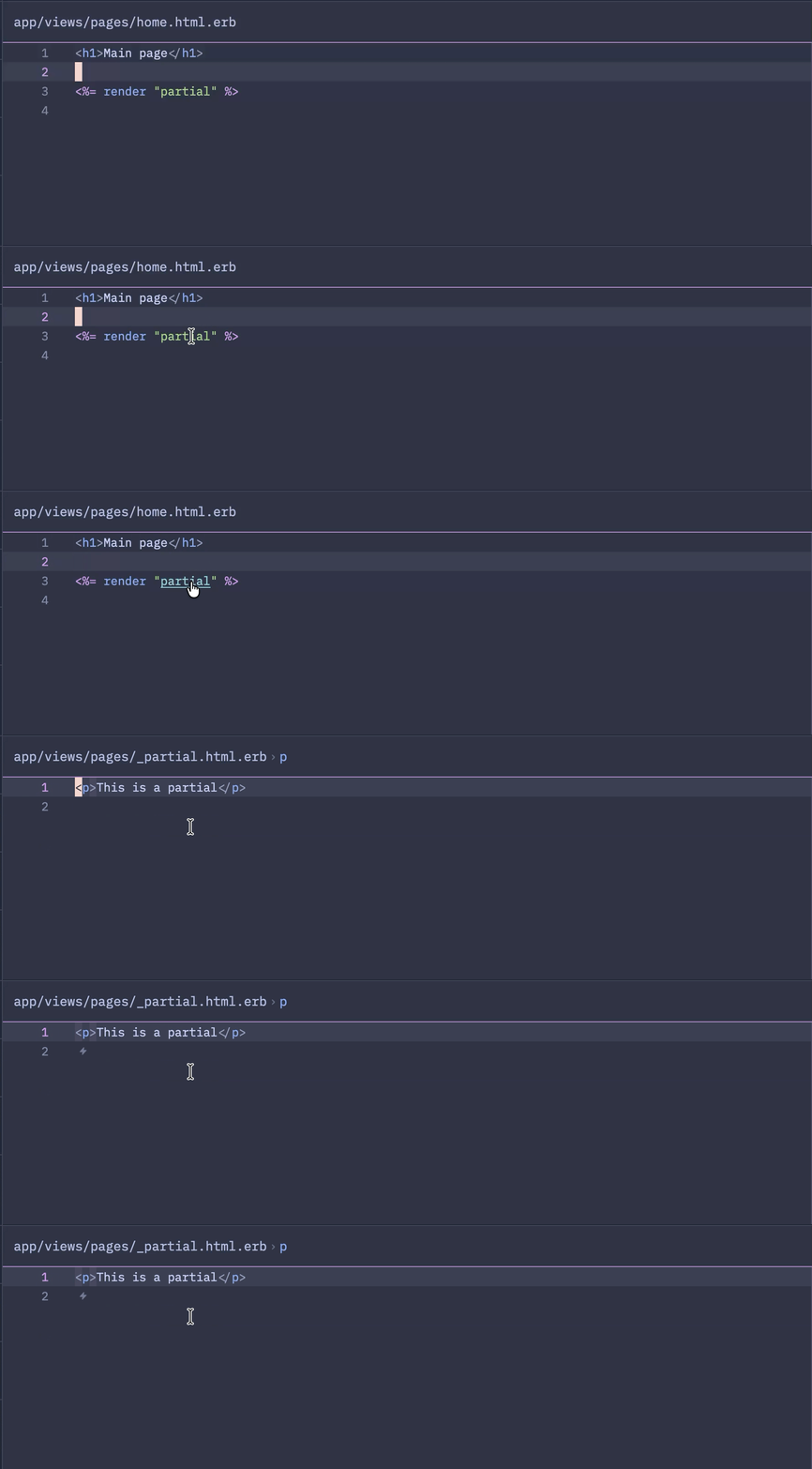
Once you restart Ruby LSP, you can now try it out in the editor:
Closing words
I had no prior experience with Prism or any other Ruby parser, so going into this was scary at first. But working with Prism was surprisingly intuitive — I could see why it became the canonical Ruby parser. I didn’t expect to need to be so precise when inspecting node context, but it makes a lot of sense.
The template resolution shown was simplified for the article. It doesn’t handle controller inheritance, :variants, :formats, :handlers, alternative view_paths etc. For that it would need to call the actual controller to perform the view template lookup. I baked all this into my pull request to the Rails add-on, hopefully it will get merged 
I’m excited for all the improvements Shopify is doing for Ruby LSP, such as creating Rubydex which makes code indexing efficient and comprehensive. It’s an important tool for making Ruby development feel modern, and the add-on architecture creates exciting possibilities.